Making AI agents:
Best Practices (Advanced)
Best practices are a crtical part of getting the most out of the many powerful conversational aspects of the Ascent platform. Here are some more advanced design tips to help you optimize user experience and agent peformance on Ascent. Ascent Platform
Use The Correct agent Request
Ascent supports two main types of agent request:
choice-based; which collects structured user input such as "Option A" or "Option B". free-text; which collects open-ended "free-text" user input, such as a full sentence or more.
If the goal of a given request is to guide users to pre-defined pathways
or to gather user input on a limited set of options, use the choice-based
request type. It is deterministic, quick, and almost error free, becuase it's completely rule-driven.
If your goal is to elicit open-ended user input, e.g., their insights or unanticipated responses on a particular topic, use a free-text request. Be aware that if you're offering the user the right to enter just about anything, the possibility of digressions or ambiguous responses is quite high. It's unfair of a user to follow "the lines" of a conversation when the guard rails are simply not there. To handle the unexpected (which you should of course, expect) it's always wise to choose an Ascent built-in dialog to get your conversation through such situations in a simple, almost automatic but still completely naturalistic way. If necessary, you can write your own custom agent actions to handle specific digressive user input that you wish to capture and address to drive the conversation in different and interesting ways. The more you master our platform, the more capable you will be at writing conversations that feel open, free and user-driven - while maintaining control over their ultimate outcomes.
Use The Correct agent Trigger
Depending on your agent application, the choice of trigger is critical. There is a big difference between using the contains-keywords trigger and the
is-similar-totrigger when customizing your agent's actions.
When to use 'Keywords'
In general, contains-keywords will help better syntactically match a user input as long as the input contains the keywords. The requirement that user input conform to any other characteristic makes contains-keywords the most flexible and percentage-friendly way of defining your triggers.
Let's imagine that your agent asks What's your favorite fruit?. If your agent is interested in how many of its website's customers eat strawberries, it might define the trigger contains-keywords with the keyword strawberry.
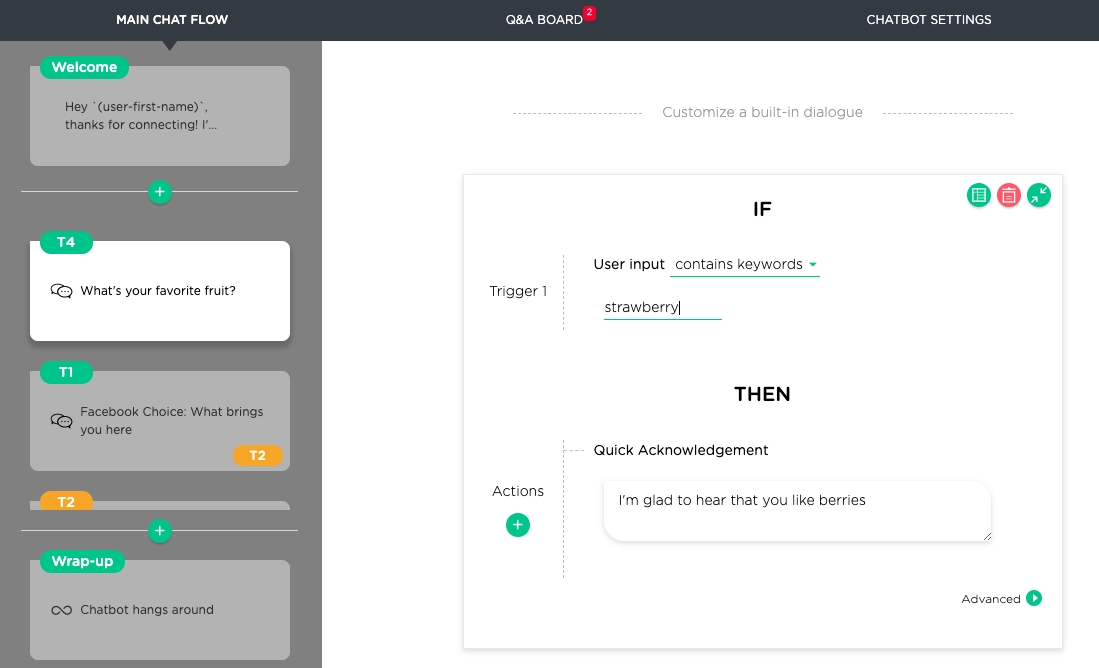
So that if the user input contains the keyword, when input such as I really like strawberries is entered the trigger will fire.
To sum up, if you wish to capture a particular word/phrase regardless of how it appears
syntactically in an input, use contains-keywords.
When to user 'Is Similar To"
But supposing your bot was interested in knowing who "didn't like strawberries". This would be a perfect scenario for the user of the is-similar-to trigger.
The best practice in this scenario would be to enter is-similar-to examples such as I really like fruit, except strawberries and I don't like strawberries
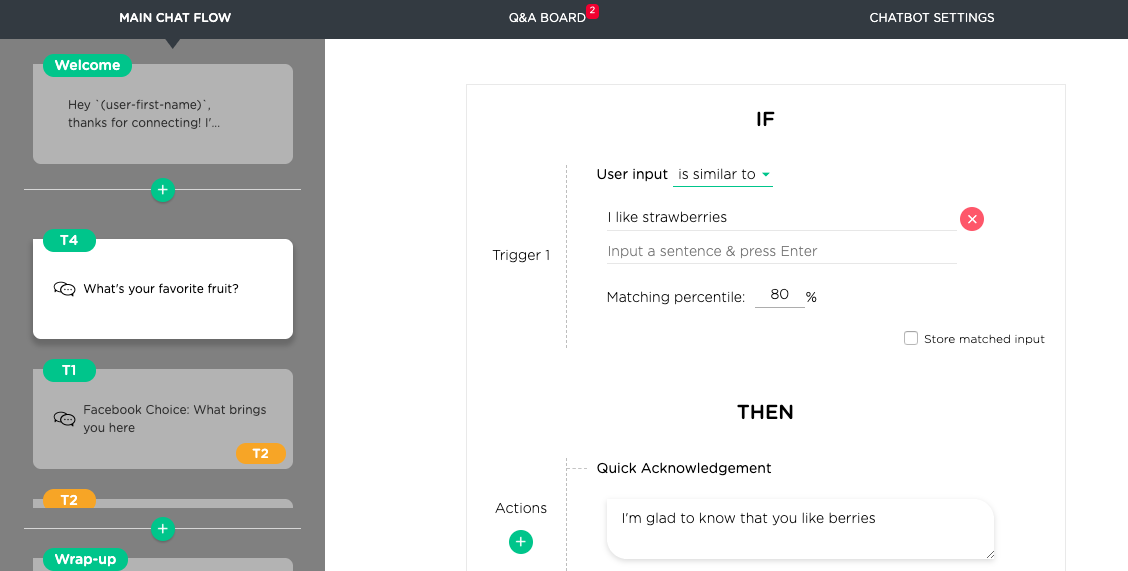
In short, the rule of thumb here is that if your aim is to capture the semantics of a given user input more accurately, usingis-similar-to where
you can give words, phrases, and full sentences as examples, and cover your bases with extra variations, is the way to go.
A note on Stemming and Lemmatization
Yes, the keyword was strawberry and the sentence includes it as its plural strawberries, but Ascent
automatically handles stemming and lemmatization in both contains-keywords and is-similar-to sentence matching, so you're always covered, without having to program or enter the variations yourself.
Sensible Labels Are Important
The label of a free-text request isn't just a label, it actually has a number of critical roles to play in the way the Ascent Engine parses and interprets information. Here's a list of a label's main functions;
- Labels summarize an Agenda topic (i.e., displayed on the topic card in the left sidebar vertical scroll panel)
- Labels set the context for a match search for relevant built-in Ascent Ad-Lib Topics
- Labels set the context for understanding and responding to user inquiries.
- Labels index user answers in an audience report.
1. See Your Structure In Seconds
The clearer and more concise the labels, the quicker you'll understand the strengths and weaknesses of your structure, and the faster you'll be able to navigate through the design and preview of your bot as you prepare it for primetime.
2. Search for Built-in Ascent Dialog
The more accurate the label the better Ascent will find the best Ad-Lib Topics to cover your digressions away from the main flow and get your users back to where you need them to go. And the best part is this. The more accurate the matches with ad-lib topics, the less customization you'll have to do. As we build our ad-lib topics, the need to customize might even go down to the magic number. Zero.
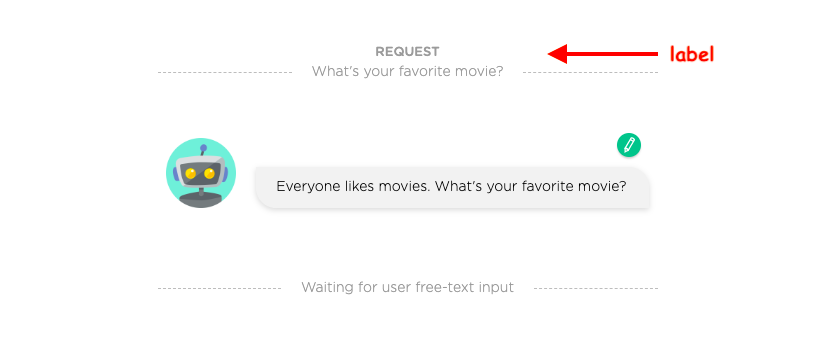
Here's an example of a simple, sensible label.
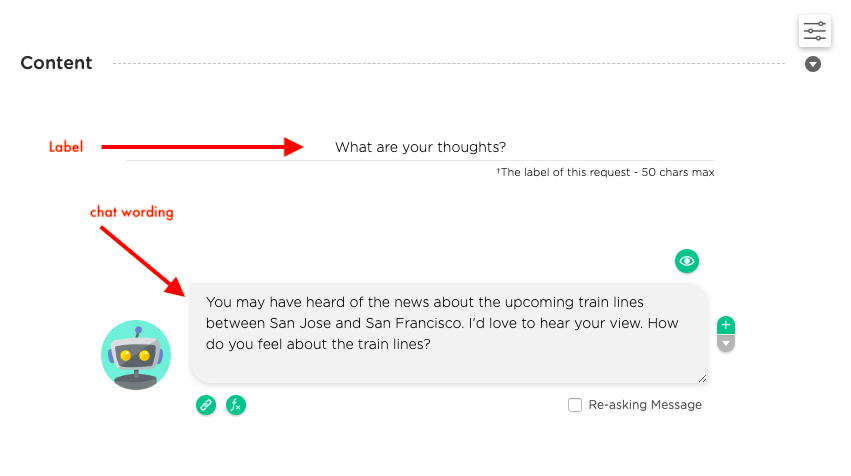
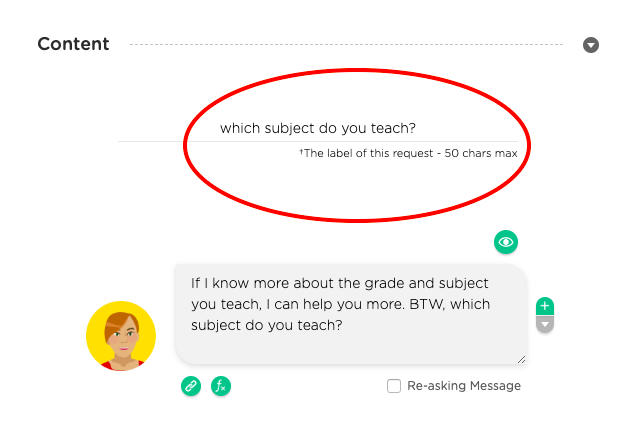
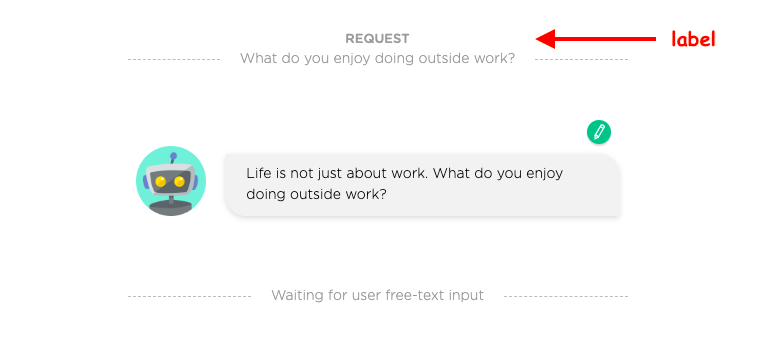
Here is another slightly longer example.
Of course, if your label choice isn't pulling up the ad-lib topics that match your agenda topics, you just have to change the labels you're concerned about, and the next time you preview the engine will give you new choices to consider. To find a good label, reverse engineer the process by browsing Ascent ad-lib topics.
3. Handle Context-Sensitive User Inquiries
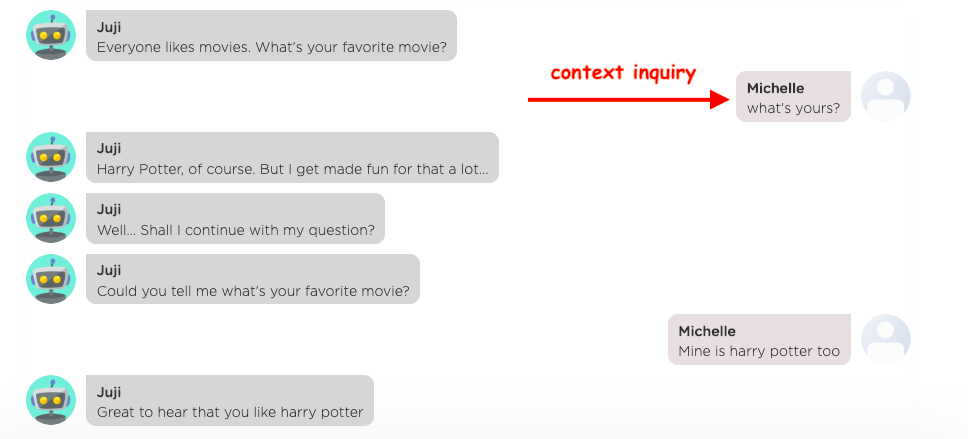
A context-sensitive inquiry might involve something like this. Say an agent asks Everyone loves movies. What's your favorite
movie?. A user may ask a reciprocal question instead of answering the question What's yours. In such a case, the agent must first translate
this user inquiry What's yours into a full inquiry What's your favorite movie based on the context before processing the user inquiry.
Currently Ascent automatically translates a context-sensitive user inquiry based on the label instead of the request itself, because a well-chosen label is often the quickest and most accurate way to capture the core of a topic. In other words, to capture context (and trust us, that's the holy grail of agents), all you have to do is label your topics smartly. Ascent's codebase does the rest. Here are a couple of examples to illustrate the importance of smart labelling.
Example I
In this example, the label captures the core of the request but not additional description.
Based on this label, here's context-friendly response to the user inquiry that easily takes care of what in other engines would require a good chunk of time to get right.
Example II
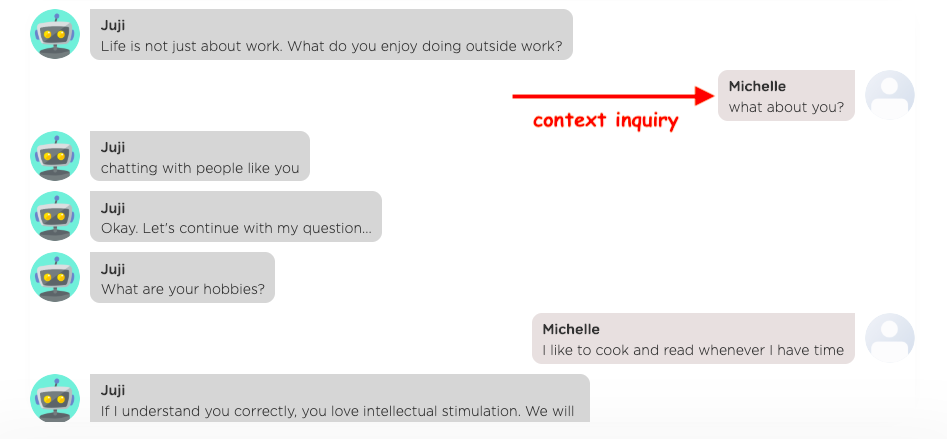
One approach is to capture the stem of the question with a keyword of context.
Again, the snippet of conversation gets the context spot on without any fuss.
4. Label User Responses in Audience Report
Labelling is also critical to working out which topics are delivering the goods and which are not in the audience report.

By the way follow these instructuions to download an audience report.
Reuse or Share Ascent agents
Creating a custom agent almost always takes time and effort. Ascent allows you to easily reuse or share an Ascent agent in two ways.
- Clone your Ascent agent.
- Export or Import Ascent chatbots. To do that follow the instructions in the screenshot below.
1. Clone Ascent agents
Say you're creating an agent with multiple calls to action (redirect vs form vs coupon code). If you clone the original agent twice, all you have to do is change the ending of the bot for each of your choices, and you can then trigger activation of one type or another depending on visitor profile.
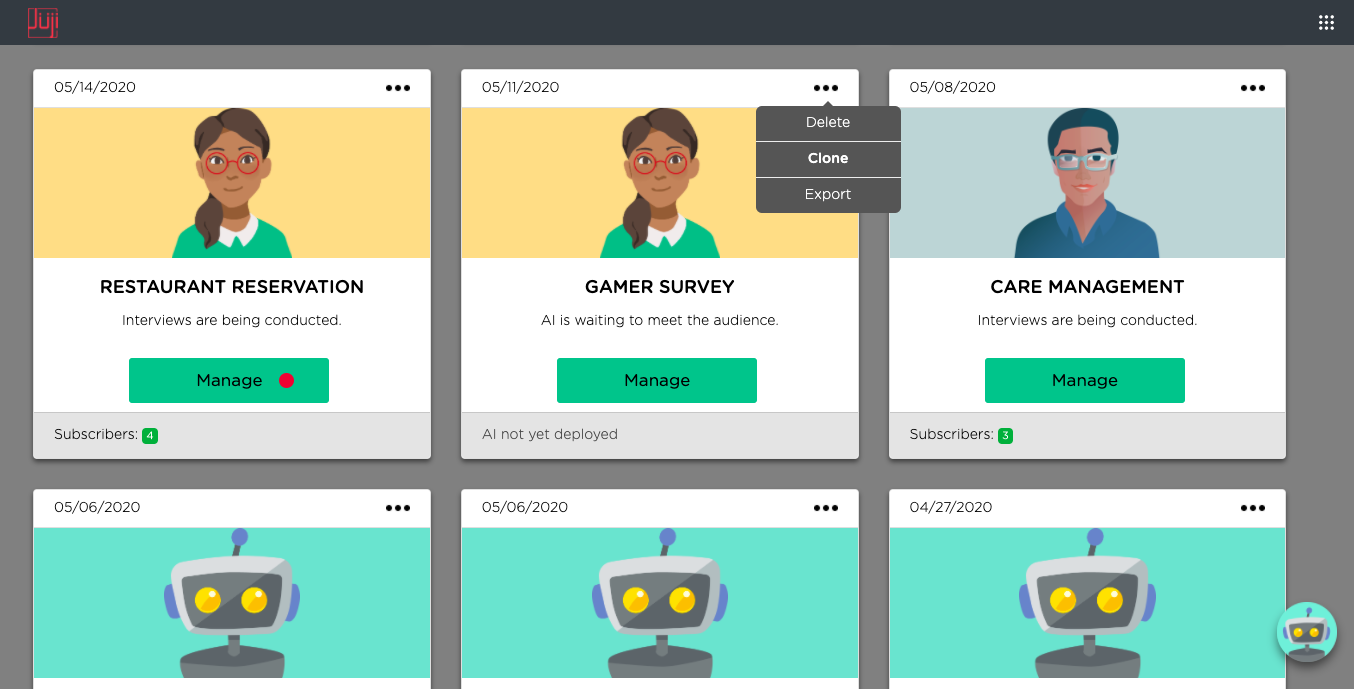
To clone your Ascent agent hit the ellipsis menu (...) on an agent in your dashboard and choose clone.
2. Export/Import Ascent agents
The export/import approach is designed to support non-simultaneous agent collaboration between the owners of different Ascent accounts. It can also facilitate a sale of an agent from one party to another.
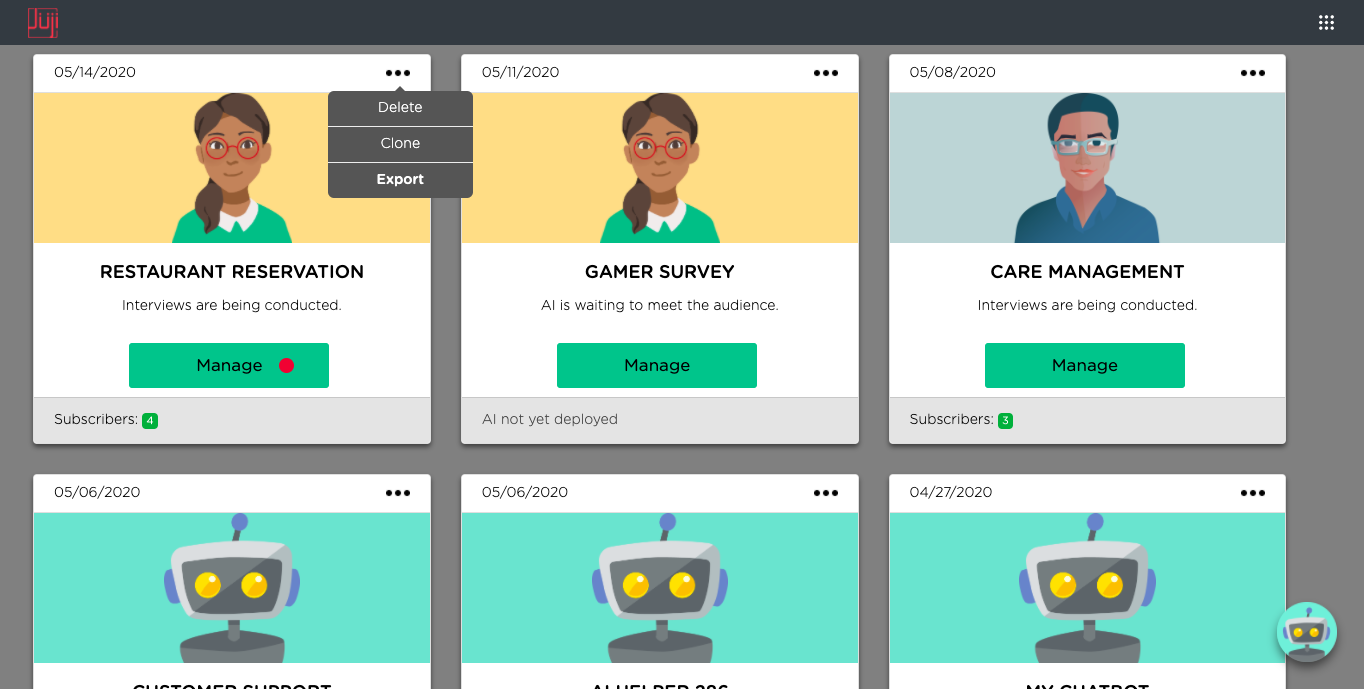
To export your Ascent agent hit the (...) ellipsis drop down menu and this time choose export to download a .juji file for your designated download folder. Give it a relevant title. For example, if it's a restaurant reservation bot, you could call the file restaurant-reservation-bot.Ascent. After that's done, you can send it to your collaborator or customer who can then import it to their own Ascent account.
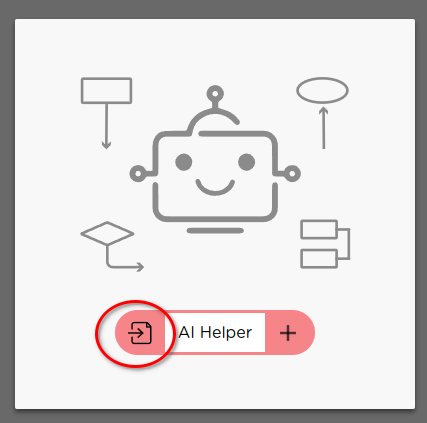
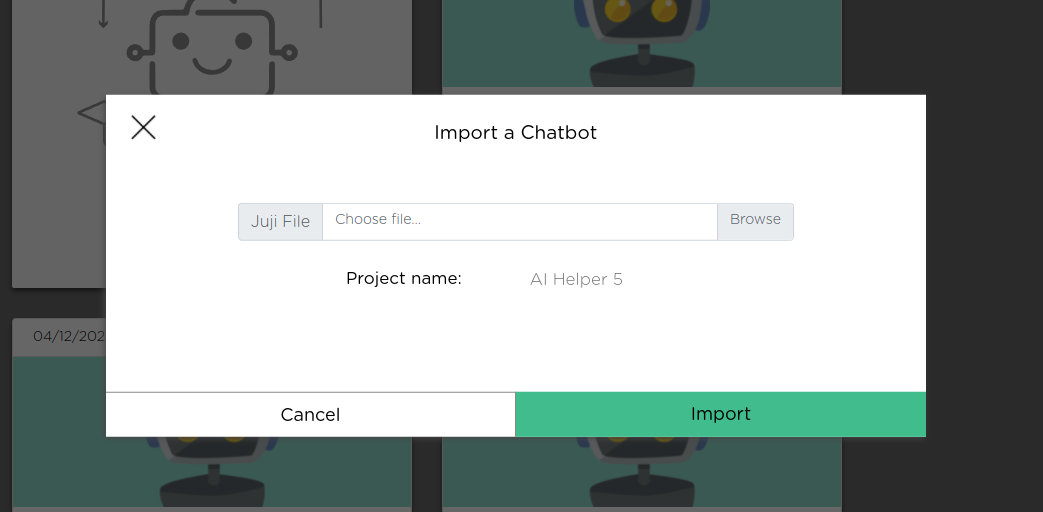
To import an Ascent agent, just click on the import icon as shown below to import an exported *.Ascent
file. After importing an agent, you can then customize,
deploy, and manage the agent as if it
were created by you from scratch.
Embed Ascent agents in Third-Party Apps
While Ascent Studio provides an easy way to author, test, deploy, and manage an AI agent, Ascent API provides the flexibility of integrating your agent into any third-party applications, such as a web or a mobile application.
The Ascent platform supports the seamless, combined use of Ascent Studio and Ascent API. For example, content creators such as social media marketers, product managers, and sales professionals can use Ascent Studio to customize the content of an agent, deploy and manage the agent. On the other side, the IT or engineering team can use the Ascent API to "embed" the deployed agent into a brand's own business applications, controlling the look and feel of the agent and making the agent "native" to the application. This separation of duties gives each team the freedom to operate while allowing them to easily collaborate on the same agent.
Such integration is also straightforward: just use the Ascent provided standard API to embed an Ascent agent into a third-party application, without the need of downloading and installing any code or SDK. Once a agent is embedded, the business team who designs the content or workflow of an agent can use the Ascent Studio to easily manage and update the agent without requiring the IT or engineering team's effort to update the embedded agent.
Power User Stuff
Check out more agent best practices or venture into Ascent IDE, our interactive development environment, and customize your Ascent agent to another level of awesomeness after setting up the key elements in Ascent Studio.