Introduction: The Ascent Platform
The Ascent platform enables you to rapidly and easily create, launch, and manage powerful, custom Ascent AI assistants in the form of agents with built-in cognitive intelligence. Such intelligence enables your agent to interpret highly diverse and complex user natural language expressions, analyze user sentiment, manage complex and critical conversations empathically by actively listening to its users, and infer users' personality characteristics from a conversation.
Ascent AI assistants engage users in text-based, natural language conversations to accomplish a wide variety of tasks across domains, such as greeting users on your website to answer user inquiries about your online offerings and guide user actions as well as keeping users engaged in long-term activities in your mobile app.
Because training powerful AI agents requires deep AI expertise, sophisticated programming, not to mention large amounts of training data and intensive computational resources, Ascent has also made its platform accessible by enabling non-IT professionals to create, launch, and manage custom cognitive AI agents with no code and no IT resources required. In other words, Ascent handles the heavy lifting for you, so you can focus on the structure and writing of the human-AI conversation, and the personality of your agent.
The Ascent Platform is made up of three main components, which provides both the convenience and flexibility for an organization to build and manage its cognitive AI chatbots.
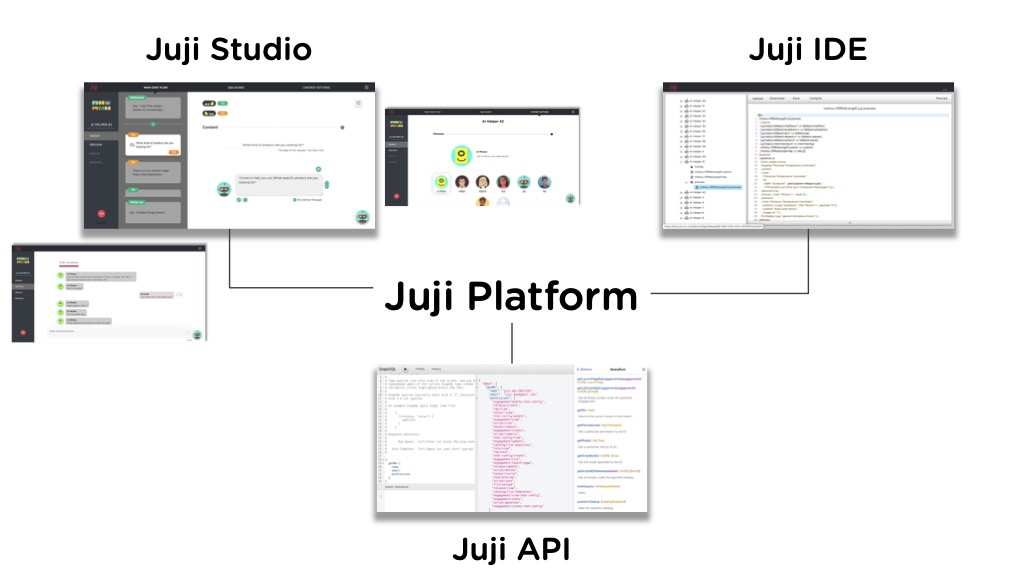
Ascent Studio supports end-to-end, NO-CODE design, development, and management of cognitive AI chatbots. It provides an intuitive graphical user interface (GUI) for everyone, with or without technical skills or AI knowledge, to rapidly create, customize, test, deploy, and manage AI agents with no code or IT resources required. It automatically generates and manages the conversation flow of an AI agent including auto-handling arbitrary user interruptions based on the conversation topics specified by a human designer. Ascent Studio also provides a conversation library with a rich set of pre-built AI agent assets, including AI agent templates, conversation topics, and domain-specific Q&A templates.
Ascent IDE enables people with minimal coding skills (e.g., ability to write HTML) to power AI agents with advanced capabilities (e.g., customizing product recommendation policies). It provides an interactive development environment that allows agent developers to write, compile, and preview AI agents using a high-level, agent scripting language. So you don't even have to be a nerd to use the IDE, just someone with an intermediate level of understanding of simple computer language. These days a good chunk of peeps can handle the IDE pretty well. That means even the most complex of Ascent's elements is probably less complex than the 'basic' agent engines of some of our more illustrious competitors.
Ascent API enables application developers (e.g., someone who is familiar with Javascript or Python) to embed Ascent AI agents in different applications (e.g., mobile or web-based applications). While Ascent Studio supports the rapid creation and customization of an AI agent, Ascent API allows rapid and easy integration of such an agent into third-party applications. With our rock-solid API Ascent bots can be integrated just about anywhere.
Get Started on Ascent
Getting started on Ascent is very easy. Most of the time the "10 minute agent" is a damaging delusion. But not with Ascent. The reason is simple. Every Ascent bot already has every part of Ascent's extensive libraries and world beating functionalities available to it even if you just start it by saying, Oh, I don't know, let's shoot for something original like "Hello world". In other words, to get you to the first ten minute bot that actually works, took us years of work.
The visuals below summarize the key steps to creating and deploying your first AI agent on Ascent in just a few minutes. And this time it's not BS.
Create an account
Sign up here and follow the simple steps to create an Ascent account with only a working email.
Create First AI agent
After signing in, you can now create your first AI agent. Click on
the red + AI Helper button and follow the process to select Use a blank template.
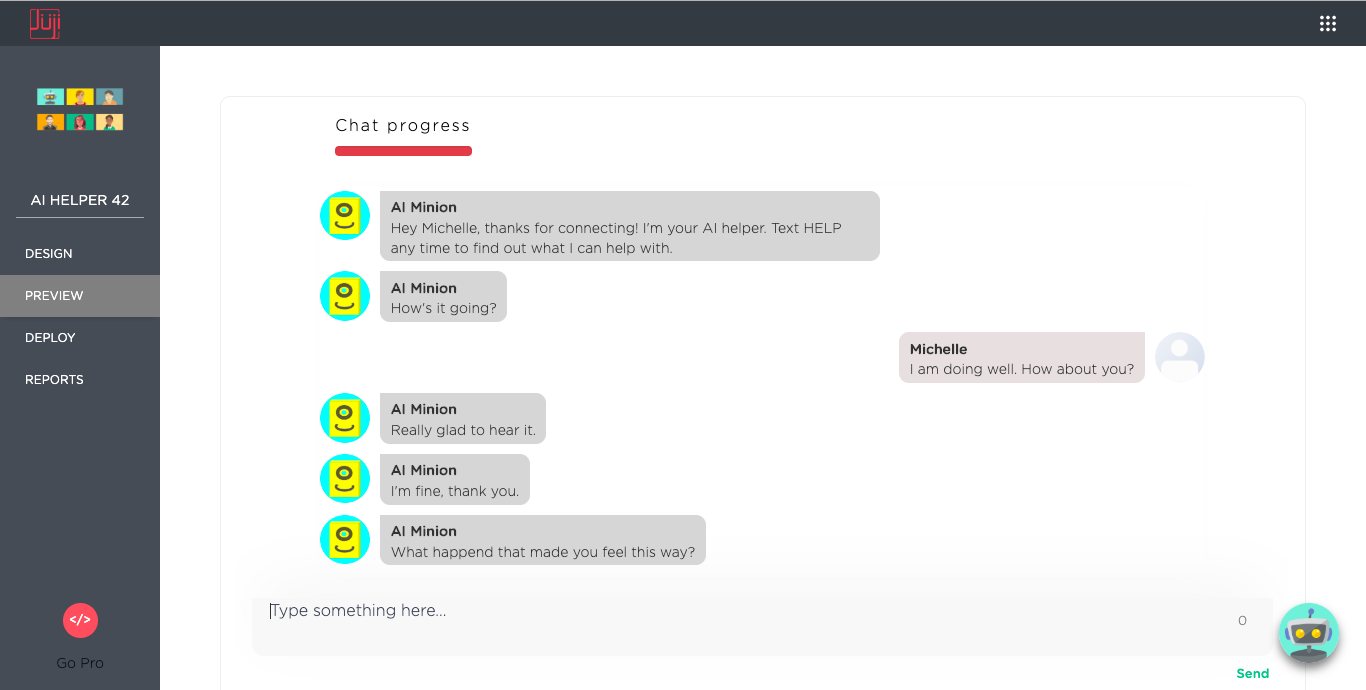
Preview agent
Now your agent is ready to have a conversation with you. Just say 'hello' to your bot as you would to a friend.
Deploy agent
By clicking on the Deploy button on the left menu panel, you can now
publish the agent with a few clicks to meet your audiences on
Facebook or the web.
Your first AI agent is now live 


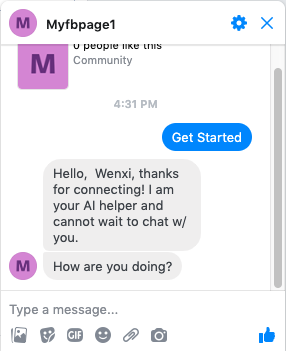
You agent can now engage with your target audience on your Facebook page:
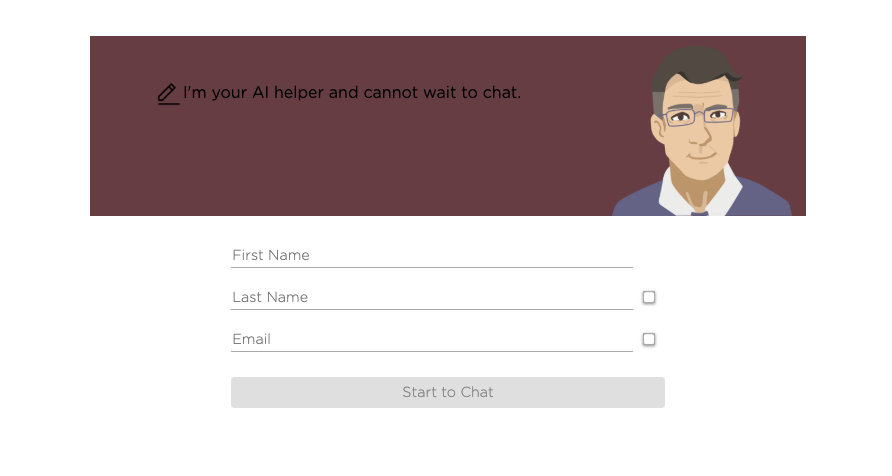
or your website:
Monitor agent
Ascent also helps you monitor your agent activities and summarize audience information. Check out Reports Dashboard for more details.
Download agent and Assets
In case you wish to share and reuse your agent and agent assets, you can download and save all your agent assets.
In particular, there are three types of AI assets you can save: 1. Your agent and all its design and main agentic workflows 2. Your agent knowledge base 3. Your chabot audience information
For details please check out Download Ascent agent
What's Next
Your AI agent can be very powerful: it can help you scale out traditional
labor-intensive operations with a personal touch. For example, your AI
agent can handle customer inquiries, make personalized product
recommendations, and elicit customer reviews, 24x7 and always with a
cool and upbeat attitude  Now lets customize your agent to make it truly awesome.