Frequently Asked Questions
General Questions
What are the differences between AI agents and non-AI agents?
- Here is a quick comparison between the two.
How do I tell if my agent is an AI agent?
- Use the quick test below to check if your agent has any AI in it. If your answer is "yes" to all questions below, your agent is definitely an AI agent.
-
Can your agent interact with your audience naturally, e.g., answering user natural language questions any time during a chat?
-
Can your agent handle multi-step tasks with highly diverse (often non-linear) user paths that are difficult to numerate or anticipate?
-
Can your agent bond with your audience through natural, social interactions?
-
Can your agent learn insights of your audience from a chat and use such insights to help them in the chat in real time?
-
Can your agent improve and learn from more user interactions over time?
Why do I need an AI agent?
- Here is a quick test to help you find out if you need an AI chatbot.(Spoiler Alert: You probably do.)
How long normally can a user chat with an Ascent agent?
- It depends on the purpose of your agent. An interview agent may chat with its users for a long period of time (e.g., 45 minutes), while an e-commerce agent may chat with its users for a couple of minutes to help resolve user issues. Please check out how to determine the optimal chat length.
How will my Ascent agent improve over time? Does it get smarter if more people use it?
- Your agent can improve over time for two reasons. First, it will get smarter if you inject more knowledge into your agent. Second, it will also improve because Ascent constantly improves its dialog library based on all Ascent agent usage and behavior. In other words, the more Ascent agents are in action, the better all the Ascent agents will get. Yes, Ascent agents have a network effect in play. Or with apologies to Alexandre Dumas. "All for one and one for all". But we don't do user-side training data, so that headache you don't have.
How long will it take to create an AI agent?
- This depends on the purpose of your agent. For example, if you want to create an e-commerce agent that introduces products and answer customer questions, it may take from a couple of hours to a few days, during which most of the time will be spent on coming up and entering the Q&A pairs. If you already have a list of Q&As and your product list is short, it would then be rather fast. For example, it would take just a few minutes to get the first version up and running and then a couple of hours to fine-tune it if you wish to do so.
How will Ascent use the data collected from interviewees?
- Privacy is very important to us. Please refer to our privacy policy at https://juji.io/util/juji-privacy-policy.pdf.
Will Ascent keep a copy of user contact information and their responses? Will Ascent retain rights to use them?
- Ascent holds privacy at the very heart of our product. We do not actively collect contact information from agent users. It is up to agent creators to decide if such information is to be collected. Although we keep chat logs, they are secured using industry standard secure protocols. Regarding details of our use of the data collected and other privacy concerns, please refer to our privacy policy at https://juji.io/util/juji-privacy-policy.pdf.
Design Questions
What does Design do?
- This allows you to customize your agent, such as its persona and agent actions.
How do I create an AI agent/AI helper/AI agent?
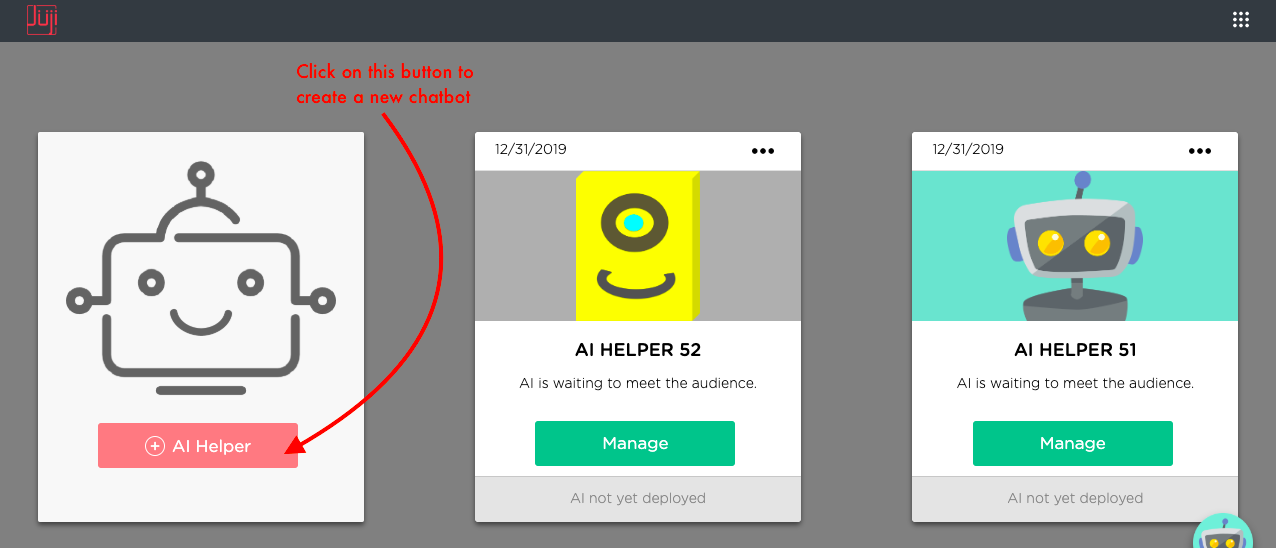
- On your dashboard, click on the
+ AI Helperbutton to create a new agent. Please check how to get started
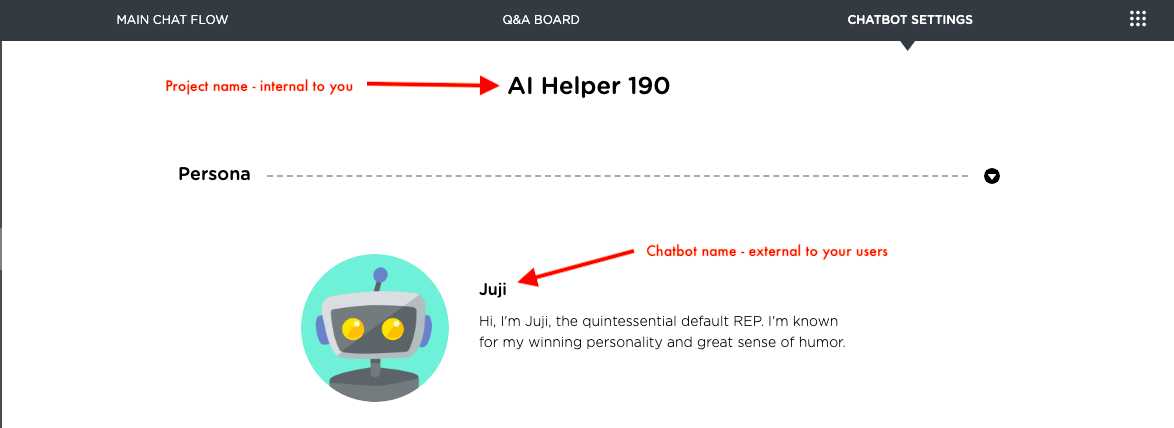
Will my users/audience see my project name?
- As shown below, your project name is internal to you, while the AI agent name is external to your audience.
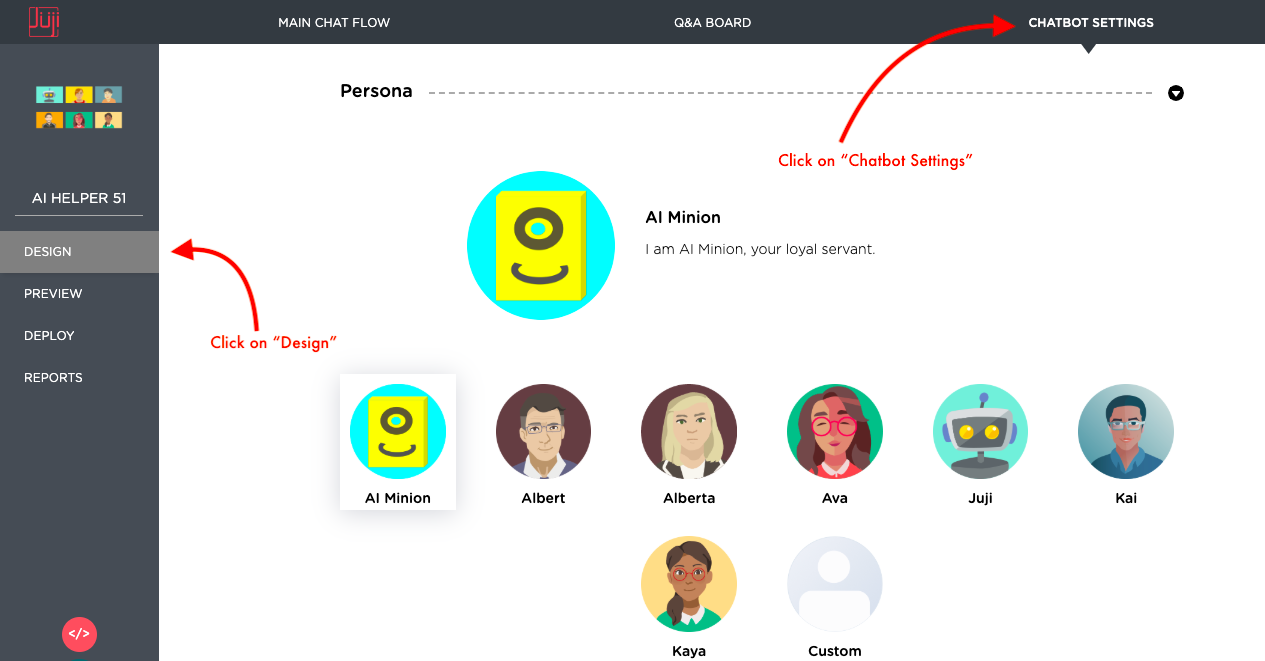
How do I change agent persona?
- Click on
Designon the left menu panel and then click onagent Settings. On this page, you can customize your agent persona. See Customize agent Persona for more details.
How can I define my own persona?
- Click on
Designon the left menu pane, then click on theCustompersona. You can then define your own custom persona. More details are under Customize agent Persona.
Will the persona I choose affect the way s/he responds to users?
- Yes, different persona may have different responses depending on the context of the chat. Please check our publication regarding the effect of agent personality.
If I give you the type of audience and information I am after, can you help me choose a fitting persona?
- We can help you choose a fitting persona if you provide more information about the interview you would like to conduct.
How do I customize a conversation?
- Click on
Designon the left menu pane, you will see the design page. Mouse over any text bubble or click on it to edit or delete the text. You can also click on any+sign to add new conversation topic.
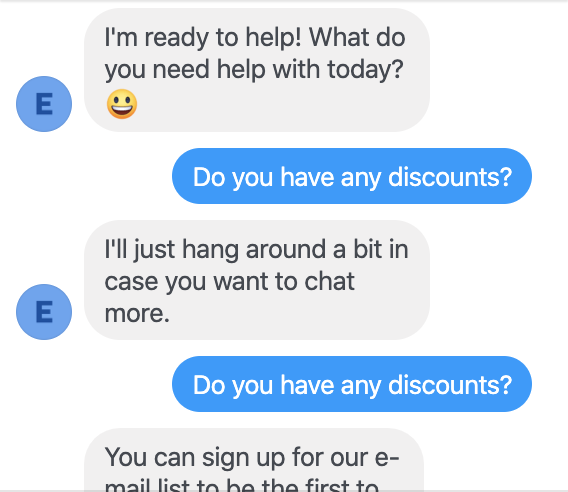
Why didn't my agent take my question?
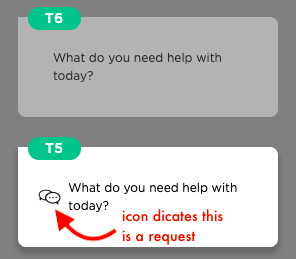
My agent asks a question, such as "I can help you now. What can I help you with today?". But when a user asks a question, the agent does not answer and I have to ask it again as shown below.
-
Ascent agents send two types of messages, one is just a message without waiting for a user to respond, the other is a "true" request, which will wait for a user to respond. To take a user input, make sure your question is a "true" question. Check the card associated with your question and make sure it looks like T5 below instead of T6. A "true" request/question has a chat icon associated with the card (T5), while a plain message does not have it (T6).
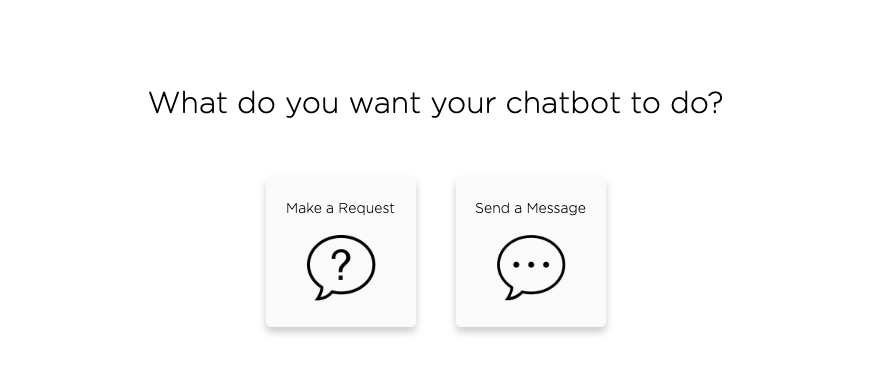
When you want your agent to send a true question, make sure you choose Make a Request option as shown below:
What is a Remark or Message?
- A remark is an agent comment in conversation that does not require user input.
What are the differences between a Message and a Request?
- A message or remark is an agent comment in conversation that does not wait for a user response. In contrast, when the agent asks a question or makes a request, it will actively wait for the user to input the answer.
What is a custom topic and how to write it?
- A custom topic allows you to customize the way you would like the bot to respond to users' inputs. Topics are the primary building blocks of the agent's conversation. The concept page of the Ascent documentation provides detailed explanation on how to write a topic.
How can I customize the agent's response to participants' answers in open-ended questions?
- You can use both Ascent Studio and Ascent IDE to customize agent responses. Also check out agent Design for specifics.
Does the agent work with interview questions which have primarily choice answers, and need only the agent's help to draw out responses for those who select “other” in their multiple choice answer?
- Yes, we support choice questions, open-ended questions, and other types of questions. Although we recommend our users to take advantage of our AI powered conversation skills and personality analysis by using open-ended questions, our agent works perfectly in chat with primarily choice questions. The AI agent can be easily set up to collect extra responses when interviewees select "other" in a multiple choice question.
How do I add a question?
- Click on
Designon the left menu pane, you can add a question by clicking any+sign then choosing the question type.
How to add a multiple choice (checkboxes) question?
- On the “Design” page of your agent, you can add a multiple choice question by first clicking the “+” sign then choosing “Checkboxes” in the popup menu.
How to add a single choice (radio buttons) question?
- On the “Design” page of your agent, you can add a single choice question by first clicking the “+” sign then choosing “Radio buttons” in the popup menu.
What is a follow-up request?
- A follow-up request is where an agent asks a question to deepen a conversation based on a user's answer to the previous question (i.e., parent question). For example, a follow-up question may be used to probe further (e.g.,
What features do you dislike most?) if a user's answer to the previous question (e.g.,How do you like the lipstick so far) contains negative or positive sentiment (see how to easily detect user sentiment in a chat). Unlike a reguar question, a follow-up question is often conditioned upon user responses to a previous question.
What are the differences between a follow-up request or a request I added using the round green + button?
When should I add a follow-up request?
Should I add a follow-up or a regular request?
- It is quite simple to test whether you need a follow-up or just a regular request. A follow-up request is always conditioned upon one or more other requests. The follow-up request will not be activated if such a condition is not met during a chat. In contrast, a regular request added using the green round
+button will be activated unconditionally as the chat flows to it. In other words, if you want your agent to always make a request regardless what happened in a chat, you will add a regular request. Otherwise, you will add a follow-up request that will depend on certain conditions, e.g., particular user responses to an agent question.
How can I capture a user's emoji like "thumbs up" and respond to it using an emoji?
- In Ascent, you can capture user emoji input in two ways. One is to capture the keyboard input of an emoji. For example, the keyboard input for the smiling face emoji is :-). To capture such a smiling face input and respond to it with a same emoji, you can create a trigger that uses
matchespattern and then respond to this pattern using the keyboard input: 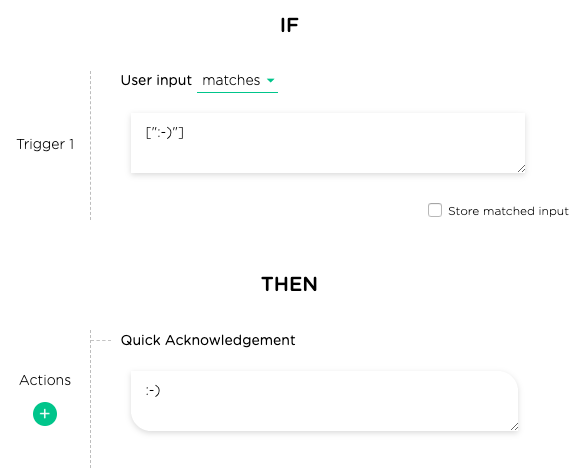
-
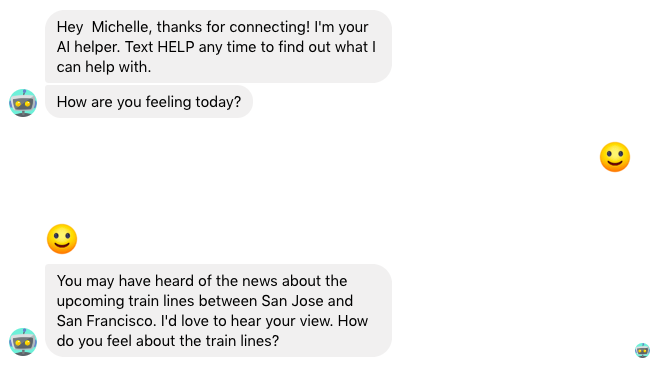
Here is the chat result that shows a user's emoji input and the corresponding agent emoji response:
-
Another way of capturing emojis is to directly copy and paste an emoji into a pattern as shown below (note that you must quote the emoji):
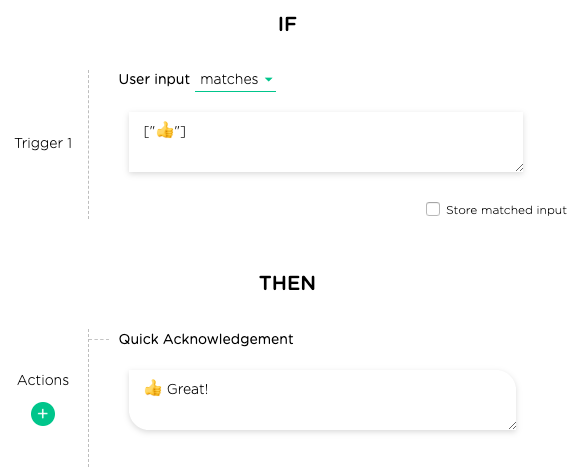
-
Here is the chat result that shows a user's emoji input and the corresponding agent emoji response:
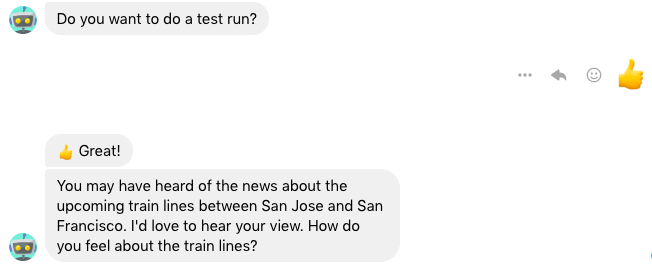
-
In addition, Ascent's built-in dialogs automatically handle many types of emojis. If you just want to use Ascent default responses to user emojis, you don't need to do anything. The example below shows such a default Ascent response to a user's frowning face emoji.
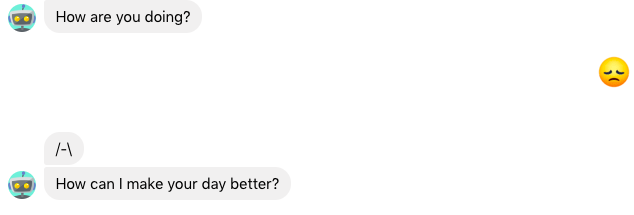
How many questions should I put in so my agent can function reasonably smart?
- This depends on your agent application. Applications that involve much knowledge especially complex knowledge may need many more questions than others. Here is a practical way to anticipate the types of questions your agent should handle. This list helps you jumpstart the smarts of your agent.
Why do I need the ID column in my Q&A CSV file? Can I delete it? Do I have to use the IDs given to me?
- The ID column is used to "index" the Q&A list so your agent knows how various questions are related to each other. For example, the questions with the same ID indicate that these questions share the same answer so you don't need to repeat the answers in the CSV entries.
- The ID column must be kept in the CSV file. You can change the
values in the ID column to whatever text labels you want to use. We in
fact encourage you to use labels that you can remember to facilitate
Q&A management. After you make such changes, make sure you choose the
Replaceoption when you upload the changed CSV file. See more tips on defining IDs.
Why do I always need to confirm the answers to the unanswered user questions on my Q&A dashboard? Can my agent learn itself? Why didn't my agent automatically learn new Q&As?
- In the background, your agent is indeed learning constantly based on its interactions with users. Like any machine learning, self-learning however may be erroneous (still remember the infamous agent Tay?). To avoid such mistakes, Ascent currently uses human-in-the-loop learning, which requires that a human verifies the learned results before adopting them.
- Here is an example where self-learned results may be problematic. Consider the chat below between a user and an agent, selling products that cure fleas. Since the agent could not find an answer to the user's question, it shows several potentially matched questions. Although the user didn't see the answer she seeks, she is interested in the answer regarding pet use anyway. So she clicks on the suggested question (option 1) and views the answer.
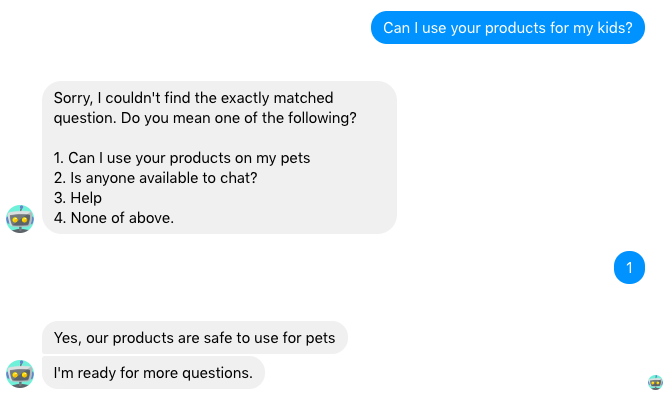
-
Through this user interaction, the agent learns that the two questions
Can I use your product for my kidsandCan I use your product for my pets?are somewhat related to each other. It then lists the latter as the top-matched one on the Q&A dashboard: 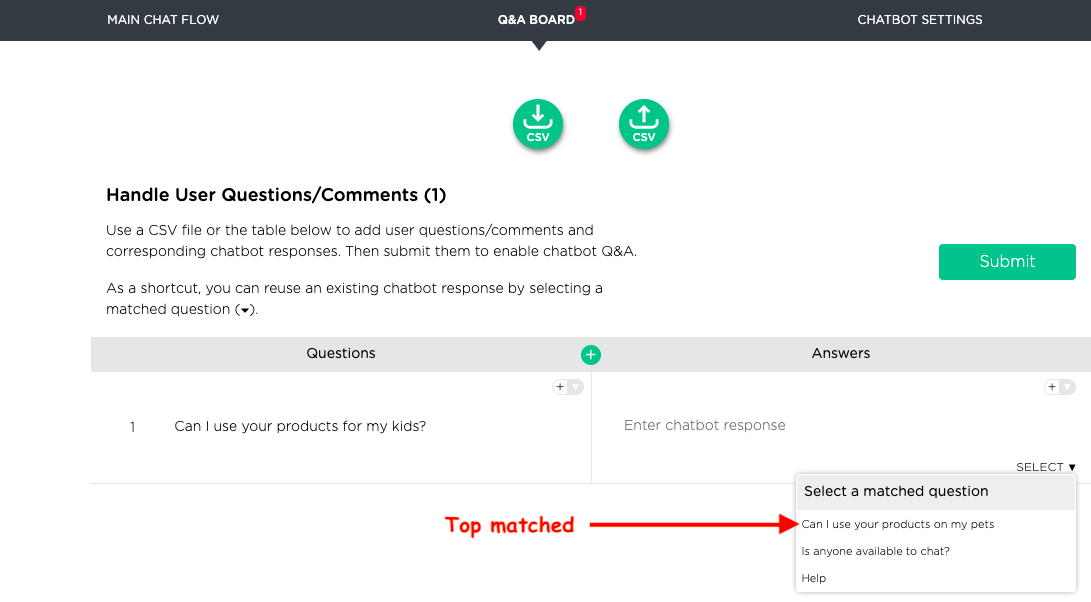
-
However, the agent cannot really determine whether these two questions are close enough to share the same answer. In this case, it might be very problematic if just making the two questions share the same answer simply based on the user interaction. Such determination is often highly domain dependent (e.g., the type of products being sold), the agent needs to be taught explicitly. Hence Ascent requires that a human manually verifies whether a matched question is indeed a good match to avoid potential mistakes. This will keep an agent's knowledge base clean, and hopefully free of errors.
How many question variations or expressions should I put in when preparing Q&A?
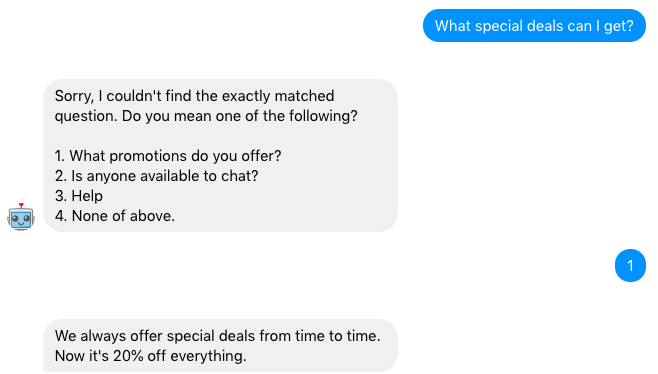
- You can start with just one expression per question. Ascent has a rich question library that will automatically augment a question you put in. Additionally, Ascent agents always try to recommend similar questions if it could not find a well matched question during a chat. You can also use the Q&A dashboard to monitor and improve the Q&A capabilities of your agent incrementally.
- Below is an example showing that an agent recommends similar questions when a highly matched question could not be found.
Why do I see overlapped topic cards or cannot add follow-ups?
- One of the most probable reasons is that you are editing the same agent in multiple windows/tabs or several people are using the same account. In these parallel sessions, you might have been editing different parts of the agent flow and conflicts were created and could not be reconciled. While we will prevent multiple sessions to be active at the same time in the near future, please check to make sure you have only one window/tab open for one agent at a time.
Why cannot my agent answer any questions even after I uploaded my Q&A CSV file?
- If this occurs, please double check the Q&A CSV file you uploaded. Make sure that all the Q&As are entered in the CSV following the required format.
How do I suspend/pause/stop/disable an agent? I don't want to delete my agent but I want to pause it.
How do I set up "out of office" for my agent?
- This is quite easy to do on Ascent. Just follow these steps to suspend an agent.
What is the difference between 'contains-keywordsandis-similar-to` trigger?
When should I use contains-keywords vs. is-similar-to trigger to guide my agent?
- To decide which type of trigger to use, please check out this tip on the differences of the two and which one you should use.
When should I use a choice question vs. a free-text question?
How should I decide a choice question vs. a free-text question?
- These two questions normally elicit different types of information. One (choice) is more structured than the other (free-text). Check out this design tip to choose one to deliver the best user experience.
What does Preview do?
- The
Previewpage allows you to test your agent before you deploy it to meet your audience.
My chat starts over again when I return to the Preview page
- This is the expected behavior. “Preview” page is set up for user to test their designed chats in different scenarios. When refreshed or returning to the “Preview” page from elsewhere, it will restart the chat.
Deployment Questions
What does Deploy do?
- This allows you to deploy your agent to meet your audience. For example, you can get a web URL and send it out with your email, or you can embed the URL on your website to meet with your website visitors.
How do I deploy my agent?
- Click on
Deployon the left menu pane to go to the release page. Then choose your deployment type. For more details, check out various deployment functions.
Should I create an agent on Facebook Messenger or on my website
- If you maintain a Facebook page or group and use this channel to engage with your target audience frequently, we recommend that you deploy a agent to your Facebook Messenger that attaches to your Facebook page or group. A Facebook Messenger agent has several advantages over a web-based deployment:
-
- Easy to deploy
-
- Easy to personalize a chat for an opt-in user
-
- Can be synced with Facebook posts or ads
-
- Native to any mobile devices
-
- Always on
How do I deploy the chat to my website?
- Go to “Deploy” page, choose web deployment to get the URL. You can then embed the URL into an iframe on your website.
After I deploy my agent, what should I do then?
- One wise agent developer says that raising an agent is similar to raising a child, you should monitor your agent and feed your agent with new knowledge periodically to improve it and help it grow. Ascent provides you with dashboards to monitor the Q&A status as well as monitor the audience interaction with your agent.
- We strongly recommend that you check your agent via the dashboards periodically. If you don't have time to do so, you may want to hire a professional (e.g., an agent agency) who can help you monitor and maintain your agent.
How to use Ascent agent with Qualtrics or Survey Monkey?
How to use Ascent agent with other survey software?
- You can include Ascent agent's Web deployment link in your survey messages. Alternatively, you can include third-party survey link in Ascent agent's messages.
I want a completion code for Mechanical Turk. How do I get a completion code?
- In the
Wrap-uptopic, if you choose to end the chat, you have an option to choose whether or not you want to display a completion code that is unique for every end-user when the conversation ends.
I don't want to collect any identifying information such as email addresses or last names
- On the web deployment, you can choose whether or not you want to collect email and/or last name from your agent end-users. The first name is mandatory for the agent to properly address the user in conversation.
Does my deployed agent operate 24/7?
- Certainly. Your agent is alive 24x7.
Will we be able to go into the agent at any time and make changes after it goes live?
- Yes, Ascent Studio allows you to do so very easily and quickly. Check out the instructions under Design.
Reporting Questions
What does Reports do?
What do the results look like?
What do I get?
What results do I get?
- The
Reportspage displays multiple types of information gathered by your agent, such as chat stats, responses from each user, personality analysis, and overall response summaries.
I don't see results of my chat
- Only the participation in a released (deployed) chat will show up in the results page. Participation in a preview chat will not be stored as results. For Web deployment, test mode is another option for testing. Compared with testing on the
Previewpage, the participation on the test mode link can be viewed on theResultspage.
Can I download the conversation results?
- Yes. They can be downloaded as CSV files by clicking the download CSV icon next to the corresponding result type. See export data to CSV for more details.
What capabilities will we have to sync to SalesForce or Marketo?
- Currently you can export all your chat data to a CSV file, which can then be easily imported into third-party applications, such as SalesForce and Marketo. Check out how to export to CSV. If you have specific data-export requirements, please feel free to write to us (support@juji.io).